
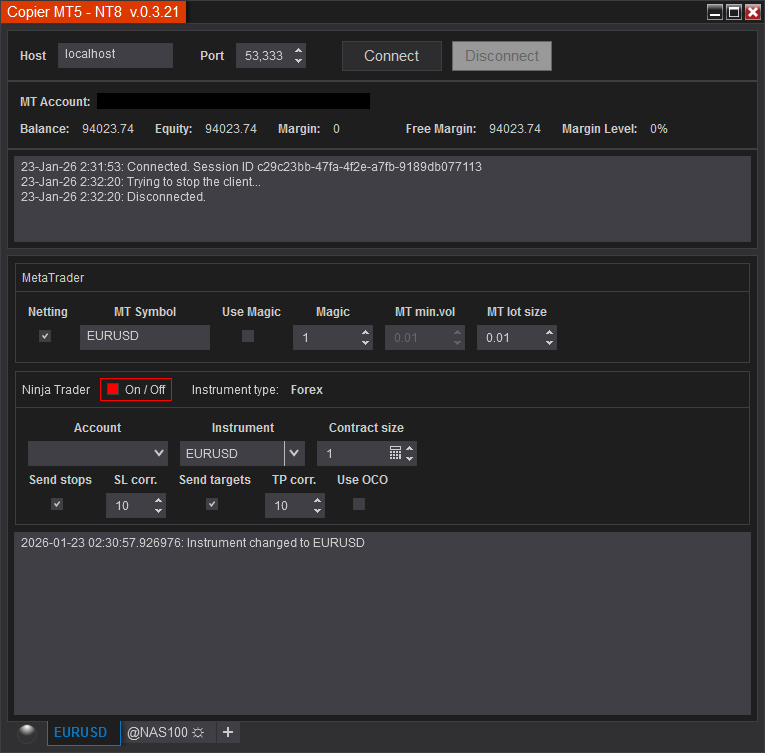
*** To add more trading instruments, click the “+” tab at the bottom, next to the open tab
- Host – IP address of the server (PC) on which the Metatrader is running. For a local PC, it can take the value “localhost” or “127.0.0.1”.
- Port – The port number through which the connection between computers will work.
* The address and port must not be blocked by the firewall. - Connect – Starts a connection to MetaTrader.
- Disconnect – Disconnecting from MetaTrader.
- MT Symbol – the exact name of the instrument as indicated in MT, from which you want to copy trades.
- Use Magic – Allows you to copy trades only with the selected Magic.
- Magic – Sets a magic number for the current pair.
- MT min.vol – Displays the volume step by symbol.
- MT lot size – Defines the size of one position in MT which corresponds to one contract (or lot for Forex) in NinjaTrader.
- On/Off – Enables or disables copying of the current instrument.
- Account – The NT8 account to which trades should be copied.
- Instrument – Displays the instrument type.
- Contract size – Minimum position size in your NT8 strategy. For example, if the Chart trader has an “Order qty” value of 1000, then the “Contract size” should also be the same. That is, the ratio “Order qty” to “Contract size” must be equal to 1.
- Send stops – Allows you to set stops in NinjaTrader.
- Send Targets – Allows you to set targets in NinjaTrader.
- SL corr. – Sets the value for the correction of stop orders, in ticks. Can be changed on the fly.
- TP corr. – Sets the value for the correction of take profit orders, in ticks. Can be changed on the fly.